Setting Your Mechanical Watch
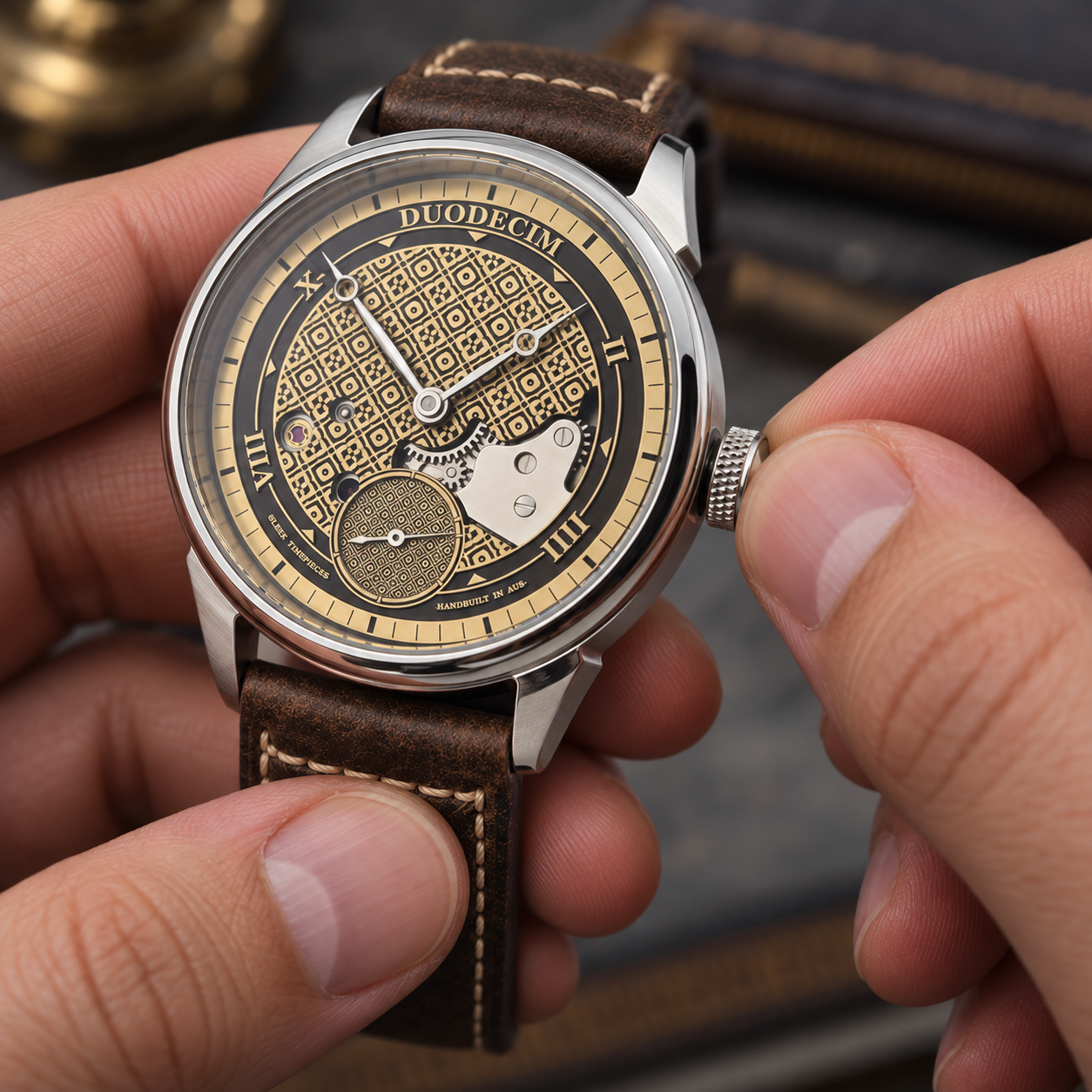
If you've never owned a mechanical watch before, we've included some basic instructions below covering how to wind your watch, set the time and date, and some important things to be aware of.
Mechanical vs Automatic Watches
The two types of mechanical watches I use are manually wound and automatic. What's the difference?
Manually Wound
A manually wound watch requires the wearer to use the crown to wind the watch's mainspring, which stores the energy needed to power the movement.
A manually wound watch needs to be wound regularly, usually every day or so, depending on the movement and its power reserve. If the watch is not wound for long enough, the mainspring will lose its tension and the watch will stop running.
Automatic
An automatic watch contains an oscillating weight, commonly known as a rotor, attached to the movement.
As you wear the watch and move your arm, the rotor spins and automatically winds the mainspring, providing power to the movement.
Many automatic movements also allow manual winding, although some older automatic movements do not.
If an automatic watch is worn regularly, the movement can continually replenish its power reserve through the movement of the wearer's wrist.
Watch Complications
Mechanical watches can have different complications.
A complication is simply a function of a mechanical watch beyond displaying the time.
For example:
A watch with a date display has a date complication.
A watch displaying both the day and date has a day/date complication.
A watch capable of tracking an additional time zone has a GMT complication.
The type of complication your watch has determines how the different crown positions are used.
Important Considerations
1. Setting the Time
When setting the time, it is generally best practice to move the hands clockwise.
If you accidentally overshoot the desired time by a minute or two, moving the hands backwards slightly is generally not an issue. However, whenever possible, set the time by moving the hands clockwise.
2. The Date-Change "Danger Zone"
Never manually change the date or day/date while the hour hand is between approximately 9 PM and 3 AM.
This applies to both AM and PM, as you may not know whether the watch is currently displaying AM or PM.
During approximately this period, the movement's date-change mechanism begins engaging to automatically change the date at midnight. Manually changing the date while these gears are engaged can potentially damage the date mechanism.
Safely Setting the Date
If you need to manually set the date:
Pull the crown out to the date-setting position.
If necessary, move the hour hand forward until it is pointing at approximately 6 o'clock.
Set the date.
You can then proceed to set the correct time.
This ensures the date-change mechanism is not engaged when manually adjusting the date.
3. Do Not Over-Tighten the Crown
When returning a screw-down crown to the fully secured position, do not over-tighten it.
The crown should be firmly and securely seated against the case, but there is no need to force it.
Over-tightening can damage the crown or crown-tube threads and may make the crown difficult to remove the next time you need to wind or set the watch.
Time-Only Watch
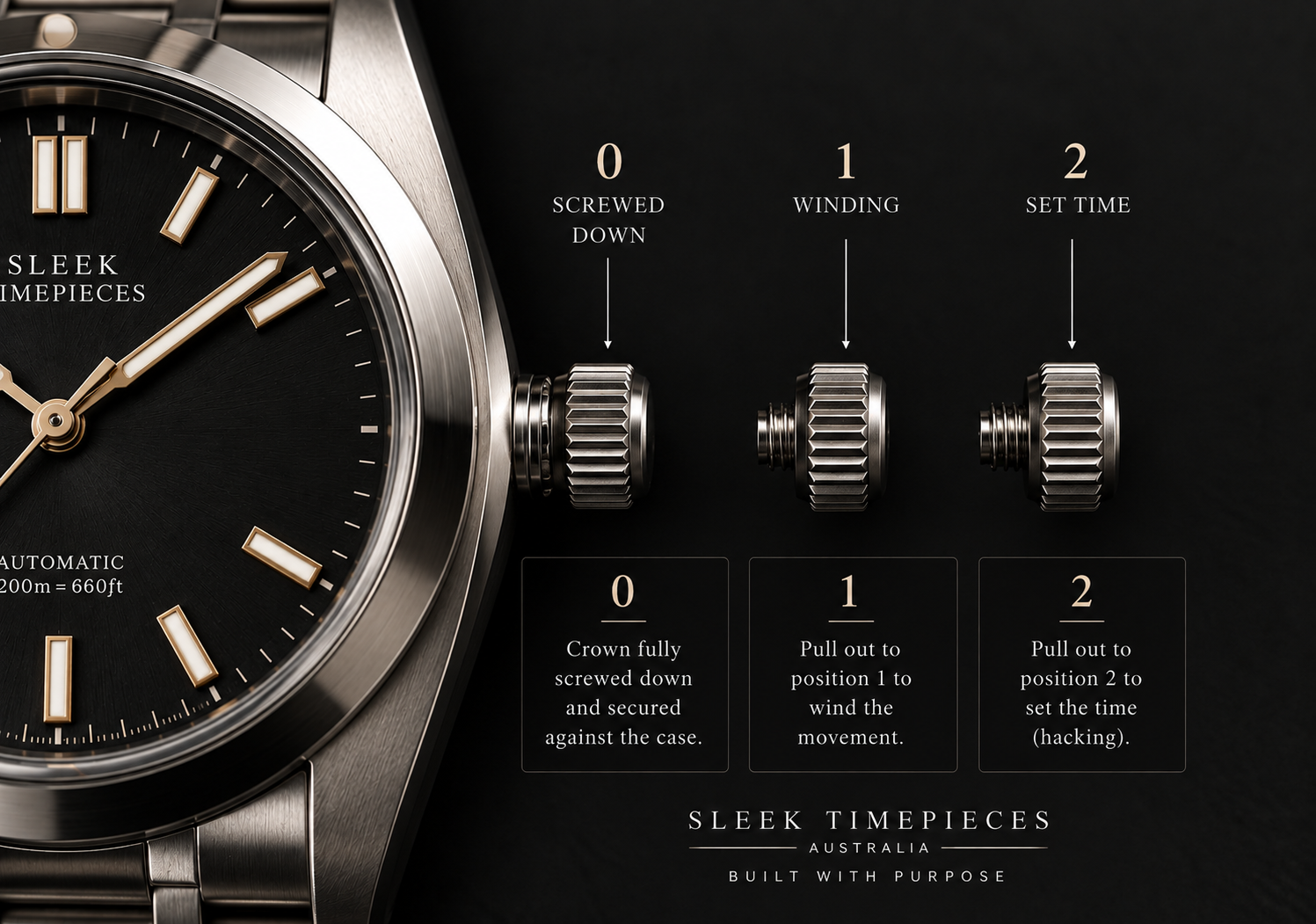
A time-only mechanical watch, such as one using a Seiko NH38 movement,
is the simplest type of mechanical watch to operate.
There are two operating positions on the crown:
Position 0 — Crown secured against the case
Position 1 — Winding
Position 2 — Setting the time
Position 0 — Crown Secured
When the screw-down crown is fully screwed against the watch case, it is in Position 0.
To unscrew the crown, turn it counterclockwise.
Once fully unscrewed, you will feel a small pop as the crown disengages from the crown-tube threads and moves into Position 1.
Position 1 — Winding
Position 1 is used to manually wind the mainspring.
Rotate the crown clockwise to wind the watch.
If the movement has stopped completely, approximately 40 turns will provide a full wind on many of the movements used in my watches.
After several turns, you should see the seconds hand begin moving.
Position 2 — Setting the Time
Pull the crown gently into Position 2.
On movements with hacking, the seconds hand will stop moving. This allows you to set the time more accurately.
Rotate the crown clockwise to move the hour and minute hands forward to the desired time.
Once the time has been set:
Push the crown back into Position 1.
The seconds hand will begin moving again.
Push the crown toward the case while turning it clockwise to re-engage the screw-down threads.
Tighten the crown until it is securely seated against the case.
Do not over-tighten.
Date or Day/Date Watch
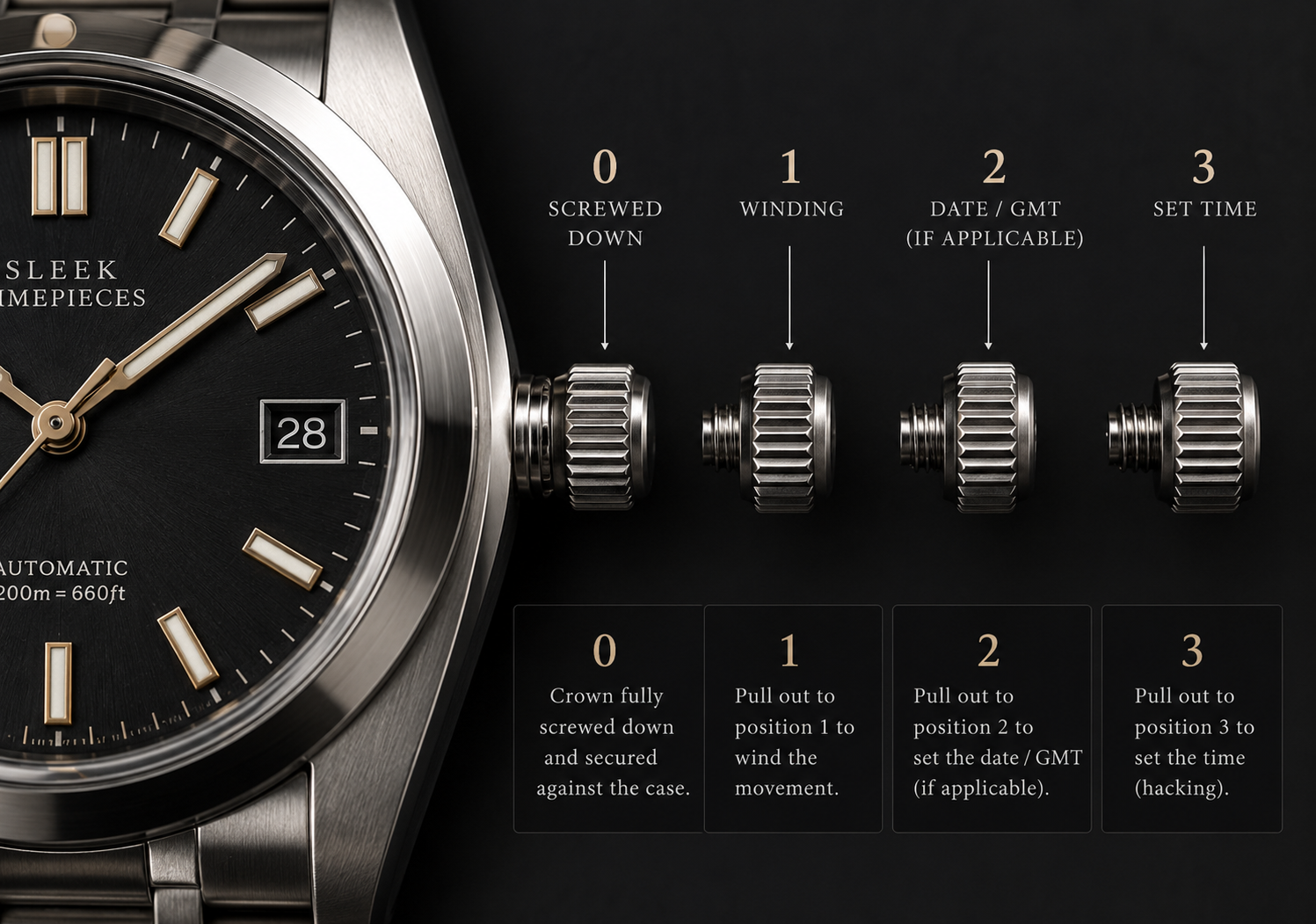
The operation of a date or day/date watch is similar to a time-only watch, but with an additional crown position.
Examples include:
NH35 — Date
NH36 — Day and date
Crown Positions
Position 0 — Crown secured against the case
Position 1 — Winding
Position 2 — Setting the date/day
Position 3 — Setting the time
Position 0 — Crown Secured
The crown is fully screwed down against the case.
Position 1 — Winding
Rotate the crown clockwise to wind the mainspring.
If the movement has stopped, approximately 40 turns will provide a full wind on many of the movements used in my watches.
Position 2 — Setting the Date
On an NH35, Position 2 is used to set the date.
Rotate the crown counterclockwise to advance the date.
On an NH36, Position 2 is used to set both the day and date:
Rotate the crown clockwise to advance the day.
Rotate the crown counterclockwise to advance the date.
Important: Never use the quick-set date/day function when the watch is displaying a time between approximately 9 PM and 3 AM.
Position 3 — Setting the Time
Pull the crown into Position 3.
The seconds hand will stop moving if the movement has a hacking function.
Rotate the crown clockwise to move the hour and minute hands forward to the desired time.
Recommended Method for Setting the Date
A useful way to ensure you have the correct AM/PM setting is to first set the date to one day before the actual date.
For example, if today is July 10, set the date to July 9.
Then move the hands forward through midnight until the date changes to July 10. You will now know that the watch is displaying the correct AM/PM cycle.
Once the correct time has been set:
Push the crown back into Position 1.
Push the crown toward the case.
Turn the crown clockwise to re-engage the screw-down threads.
Tighten until securely seated.
Do not over-tighten the crown.
GMT Watch
Important Note
The GMT watches I build typically use the Seiko NH34 movement.
These are known as Caller GMT or Office GMT watches.
A Caller GMT allows the GMT hand to be adjusted independently from the main hour and minute hands.
This differs from a Traveller's GMT (True GMT), where the local hour hand can be adjusted independently.
What Is a GMT Watch?
A GMT watch allows you to track an additional time zone while still displaying your local time.
GMT watches can usually be identified by their fourth hand, which completes one revolution every 24 hours.
They are often paired with a 24-hour bezel that allows the additional time zone to be read.
The GMT hand follows a 24-hour scale:
1–12 = AM
13–24 = PM
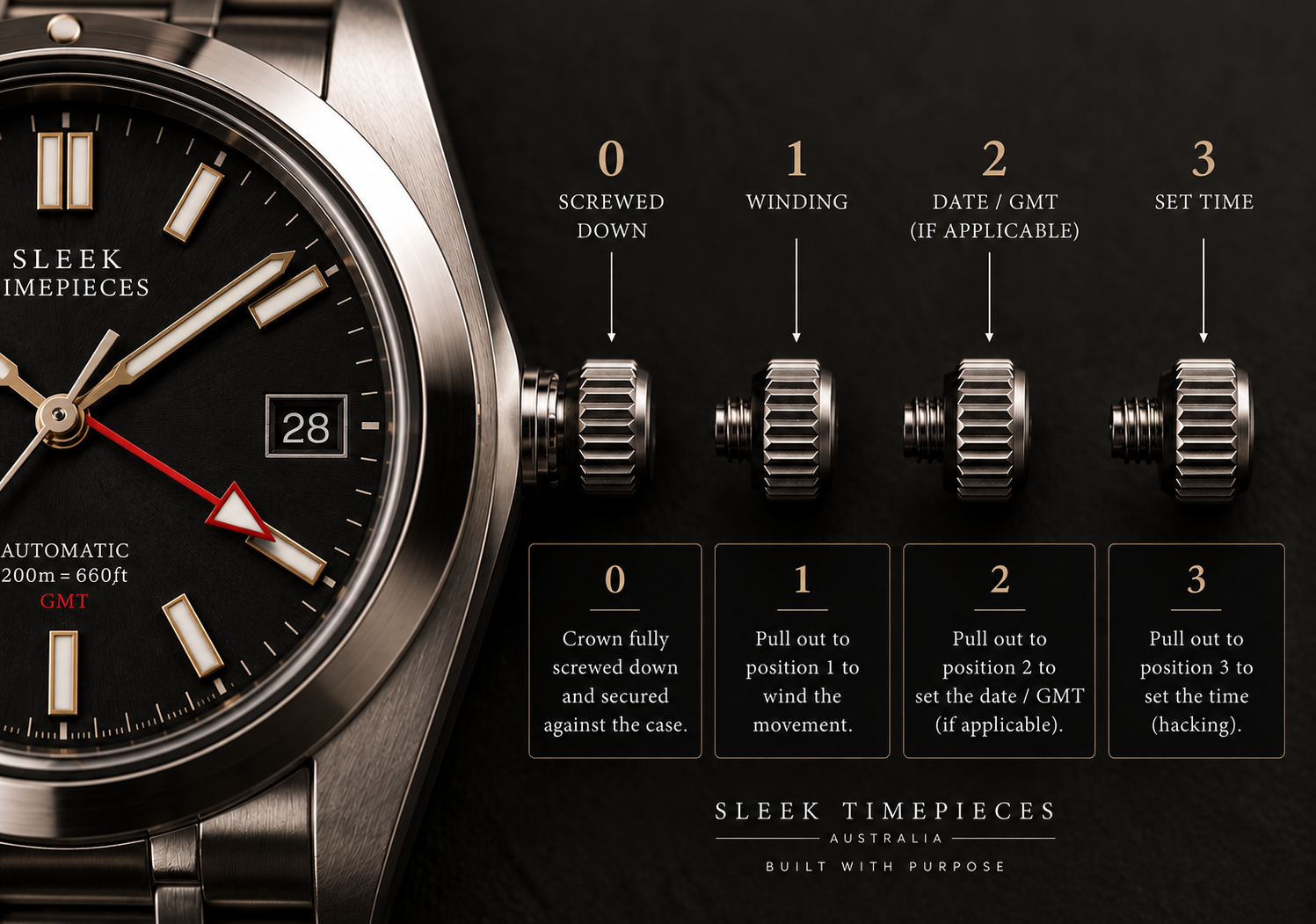
Setting a Caller GMT
A Caller GMT operates similarly to a date watch, with one important difference.
Position 0
Crown secured against the case.
Position 1
Used to manually wind the movement.
Rotate the crown clockwise.
Position 2
Used to adjust the GMT hand and date.
Rotate the crown clockwise to adjust the GMT hand.
Rotate the crown counterclockwise to advance the date.
Position 3
Used to set the main hour and minute hands.
Pull the crown into Position 3 and rotate it clockwise to set the local time.
The seconds hand will stop if the movement has a hacking function.
Setting Your GMT
When setting a Caller GMT, it is best to:
1. Set the local time first.
Use Position 3 to set the hour and minute hands to your local time.
2. Set the GMT hand.
Move the crown to Position 2 and rotate it clockwise until the GMT hand points to the desired hour on the 24-hour scale.
Example
Let's say you are in Dallas, Texas, and want to track the time in London.
If London is 6 hours ahead of Dallas, and your local time is 10:00 AM, the time in London will be 4:00 PM.
You would therefore:
Set the main hour and minute hands to 10:00 AM.
Move the crown to Position 2.
Set the GMT hand to 16 on the 24-hour scale.
The GMT hand will now indicate London's time while the main hands continue to display your local time.
Finishing Up
Once you have finished setting the watch:
Push the crown back into Position 1.
The seconds hand will begin moving again.
Push the crown toward the case while turning it clockwise.
Continue until the screw-down crown is securely seated.
Do not over-tighten the crown.
Questions?
If you have any questions about using your mechanical watch, please contact Sleek Timepieces at: